




Search FAQ
Xbox Key Activation
There are several ways to activate an Xbox exclusive key. It can be done through the Microsoft redemption page, Xbox console, Microsoft Store, or Xbox application on Windows. Some keys can only be activated on the Xbox console.
Redeem via the Microsoft page
Use the Microsoft redemption page when the key supports web activation.
Open Xbox accountOpen redemption page1Sign in to Xbox
Log in to your Xbox account on the Xbox page.
2Open the redemption page
After you successfully log in, go to the Microsoft redemption page.
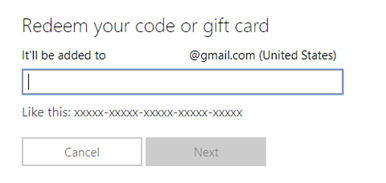
3Enter the code
Enter the 25-character code, select Next, and then follow the prompts.
Redeem via Xbox Series X|S and Xbox One
If the Xbox key cannot be activated on the Microsoft page, redeem it directly on an Xbox console.
1Open Store
Press the Xbox button to open the guide, and then select Store.
2Open Redeem
Press the View button to open the side menu, and then select Redeem.
3Enter the code
Enter the 25-character code, select Next, and then follow the prompts.
Redeem via the Xbox application on Windows
You can also redeem supported Xbox keys through the Xbox app on Windows.
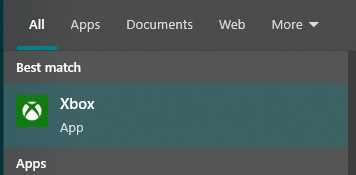
1Search for Xbox
Press the Start button, and then enter Xbox into the search bar.
2Open the Xbox app
Choose the Xbox app from the results to open the app.
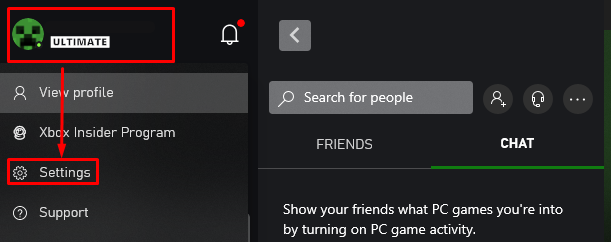
3Open Settings
Select your gamer profile in the top-left corner, and then select Settings.
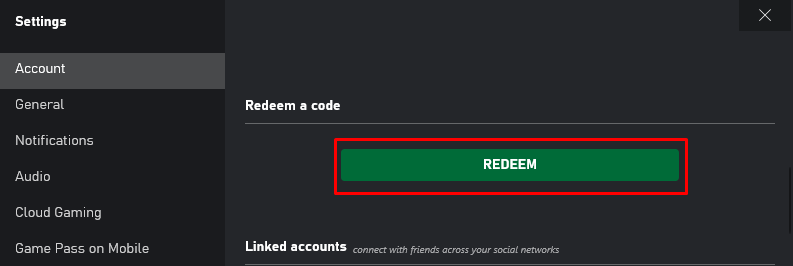
4Select Redeem
In the Settings section, scroll down and select Redeem under Redeem a code.
5Enter the code
Enter the 25-character code, select Next, and then follow the prompts.