




Search FAQ
Battle.net Key Activation
Activate your Battle.net key through the Battle.net website, the Battle.net desktop app, or the Battle.net mobile app.
Activation through the website
Use the Battle.net account website to sign in and redeem your game key online.
Open account.battle.net1Sign in to Battle.net
Visit account.battle.net and sign in to your Battle.net account, or create a new account if this is the first game you activate on this platform.
2Open Account Overview
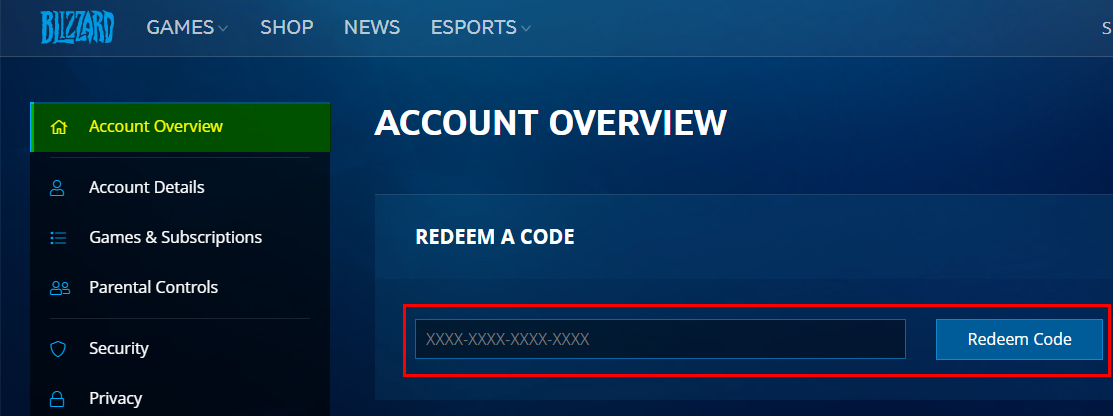
Once you are logged in, open Account Overview and find the Redeem a Code field.
3Redeem your key
Enter your key in the Redeem a Code field and click Redeem Code.
Activation through the desktop app
You can also activate your key through the Battle.net desktop app.
Download Battle.net1Launch Battle.net
Launch the Battle.net desktop app and log in to your account.
2Open Redeem Code
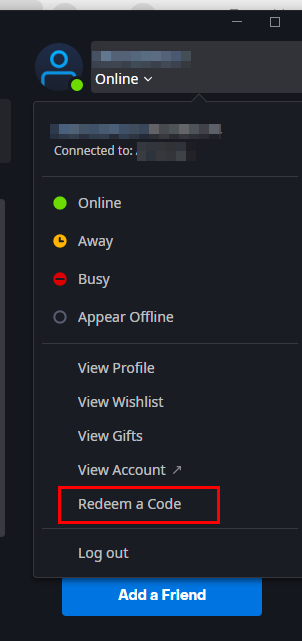
Click your profile icon in the top-right corner of the app and then click Redeem Code.
3Redeem your key
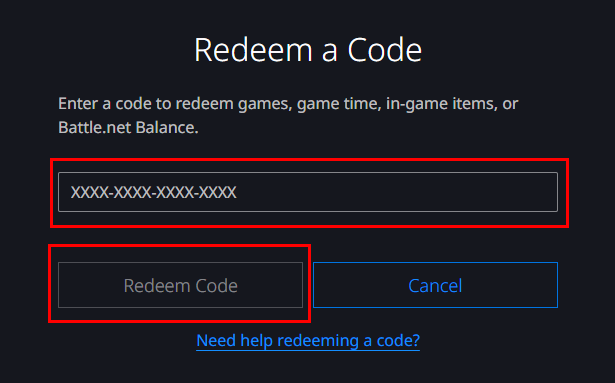
In the window that opens, enter your key and click Redeem Code.
Activation through the mobile app
If you are on your phone, you can redeem your key in the Battle.net mobile app.
1Sign in to the mobile app
Open the Battle.net mobile app and log in to your account.
2Open Redeem Code
Tap your BattleTag to open your profile, then choose Redeem Code from the dropdown menu.
3Redeem your key
Enter your key and confirm. Keys are region-locked and can only be redeemed once, so make sure you use the Battle.net account you want the game on.