




Search FAQ
Microsoft Store Key Activation
Activate your Microsoft Store key for Windows PC in the Microsoft Store app or on the Microsoft redemption website.
Activation in the Microsoft Store app
Use the Microsoft Store app on your Windows PC to redeem your 25-character key.
1Open Microsoft Store
Press the Start button, enter store into the search bar and choose Microsoft Store from the results.
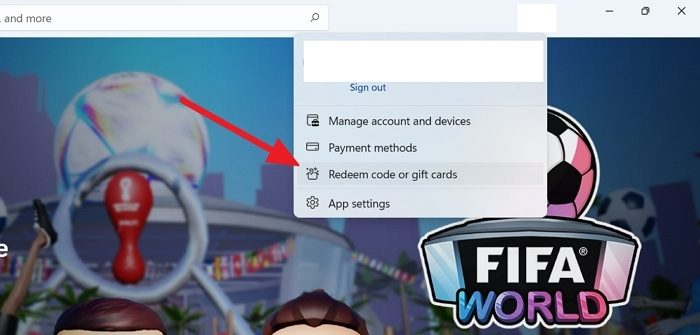
2Open Redeem code or gift cards
Select your account in the top-right corner of the screen, and then select Redeem code or gift cards.
3Enter your key
Enter the 25-character code, select Next, and then follow the prompts.
Activation through the website
You can also redeem your key on the Microsoft redemption page in your browser.
Open redemption page1Sign in to your Microsoft account
Open the Microsoft redemption page and sign in with the Microsoft account you use on your PC.
2Enter your key
Enter the 25-character code, select Next, and then follow the prompts.
Important to know
Keep these points in mind.
1Use the right account
Make sure you are signed in to the correct Microsoft account before you redeem, because a redeemed code cannot be transferred to another account.
2Install your game
After redeeming, open the Library in the Microsoft Store app on your PC and install the game.