




Search FAQ
Bethesda Key Activation
Since the Bethesda.net launcher moved to Steam in May 2022, Bethesda game keys are activated on Steam. Some promotional codes can still be redeemed on the Bethesda website.
Activate a Bethesda game key on Steam
Most Bethesda game keys are redeemed in the Steam client.
Download Steam Client1Sign in to Steam
Open your Steam client and log into your account. If you do not have an account yet, create one for free.
2Open Activate a Product on Steam
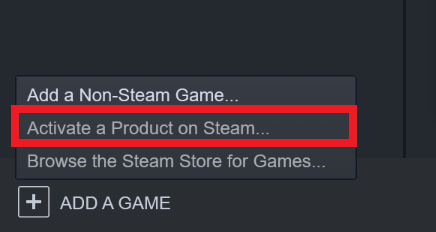
Select ADD A GAME at the bottom left of Steam (or the Games menu at the top), and then select Activate a Product on Steam.
3Enter your key
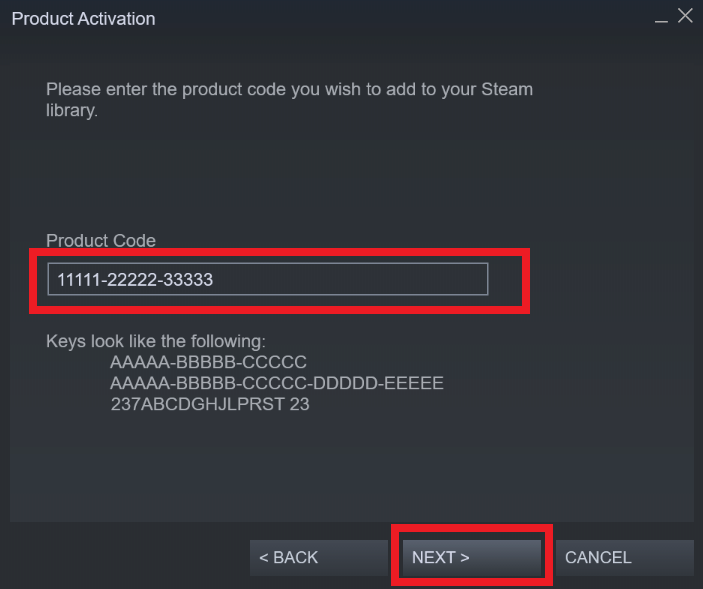
Follow the prompts and enter your key. Steam will then add the game to your Library, where you can download it.
Redeem a promotional code on Bethesda.net
Some Bethesda promotional codes are still redeemed on the Bethesda website.
Open bethesda.net1Log in to Bethesda.net
Go to the Bethesda.net website and select Log In/Sign Up. Log in, or create a new account if you do not have one.
2Open Redeem Code
Select your username in the top-right corner, select Account Management, and then select Redeem Code.
3Redeem your code
Enter the code including the dashes and with no spaces, then select Redeem. A Success! window confirms the redemption.
Important to know
Keep these points in mind.
1Code not accepted?
If a promotional code does not work on Bethesda.net, try redeeming it on Steam instead.