




Search FAQ
Meta Quest Key Activation
Redeem your Meta Quest key in the Meta Horizon app on your phone or on the Meta website. The game is then added to your library.
Activation in the Meta Horizon app
Use the Meta Horizon app on your phone, signed in with the Meta account used on your headset.
1Open the Meta Horizon app
Open the Meta Horizon app on your phone and make sure you are logged in to the Meta account linked to your headset.
2Open the Menu
Tap Menu at the top of your Horizon Feed.
3Open Redeem Store code
Scroll down to Payment and subscriptions, then tap Redeem Store code.
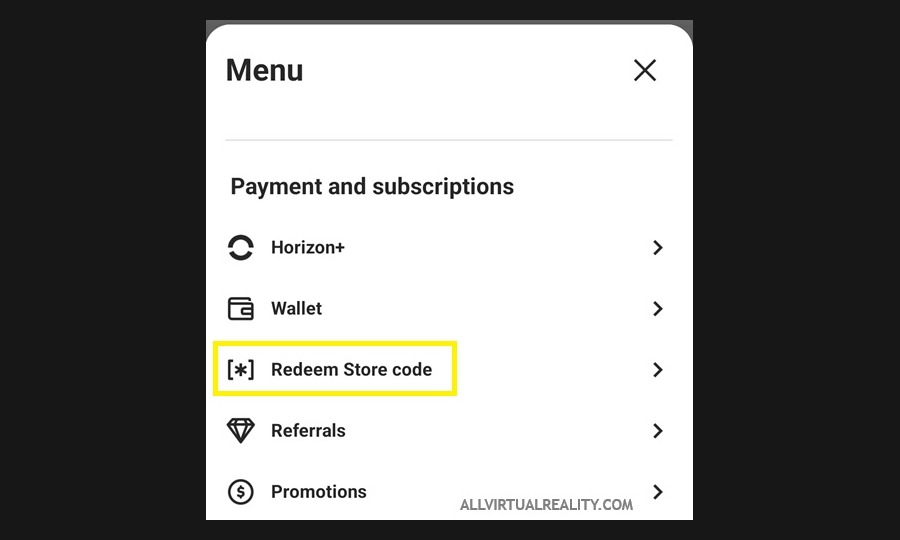
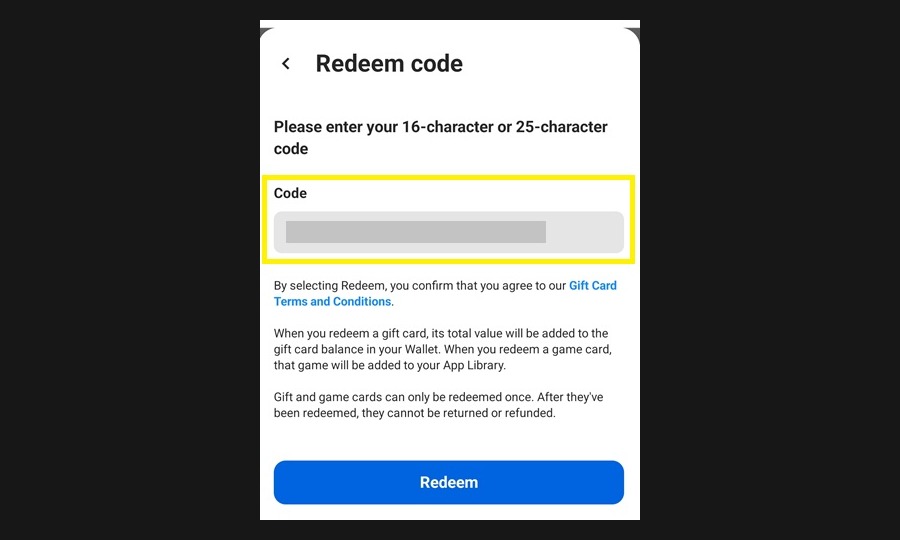
4Enter your key
Enter the code and tap Redeem to confirm. The game is now in your library.
Activation through the website
You can also redeem your key in your browser.
Open Meta redeem page1Sign in to your Meta account
Open the Meta redeem page and sign in with the Meta account used on your headset.
2Redeem your key
Enter your code under Redeem code and click the arrow to add it to your account.
Important to know
Keep these points in mind.
1Install the game on your headset
The game will start installing the next time your Quest is powered on and connected to Wi-Fi. You can also install it from your Library in the headset.
2Codes work only once
A code can only be redeemed once, so use the Meta account you want the game on.