




Search FAQ
Steam Gift Activation
A Steam Gift is not a key. The game is sent to your Steam account as a gift, and you accept it in Steam. Follow the steps below.
Open your gift link
After your purchase you receive a gift link. Open it and follow the instructions shown on the page.
Download Steam Client1Sign in to the right Steam account
Open the gift link in your browser and sign in with Steam, or enter your Steam profile link if asked. Use the account you want the game on, because an accepted gift cannot be moved to another account.
2Confirm your Steam store country
If the page asks for your country, choose the country set in your Steam account. Some gifts cannot be sent to accounts in other regions.
3Accept the friend request
Steam gifts can only be sent to friends, so accept the friend request from the delivery account on Steam. The gift is sent shortly after.
Accept the gift in Steam
Steam sends you an email and shows a gift notification when the gift arrives.
1Open the gift notification
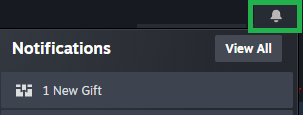
Click the notification bell in Steam and select 1 New Gift to open the gift page. You can also use the link in the gift email from Steam.
2Accept the gift
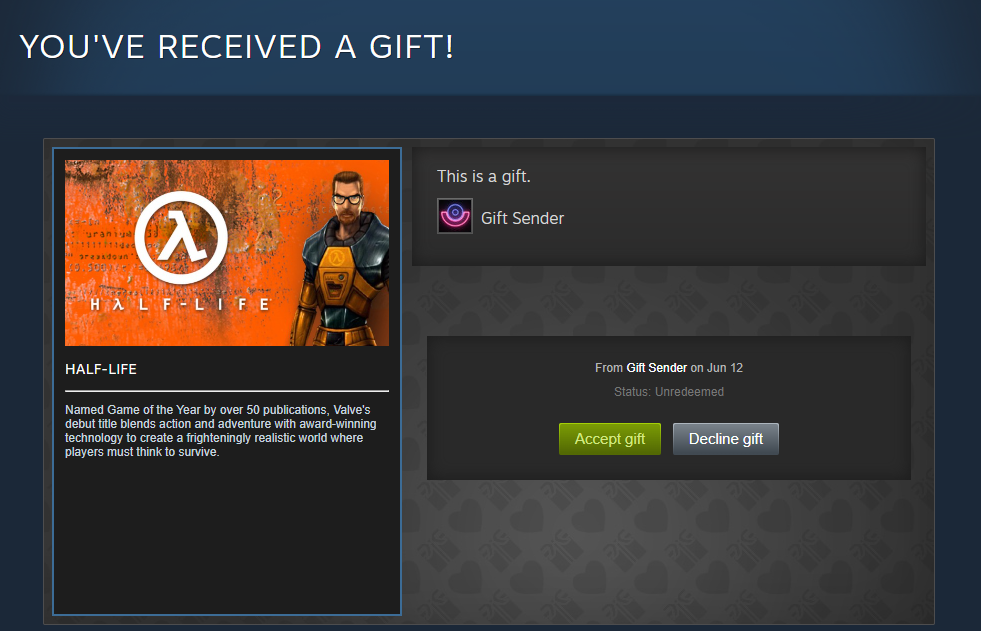
Select Accept gift to add the game to your Steam library. Do not select Decline gift, as this cancels the gift.
3Install your game
The game now appears in your Steam Library, where you can install and play it.
Important to know
Keep these points in mind.
1Accept it within 30 days
A gift must be accepted within 30 days of delivery. After that, Steam cancels it automatically.